 League of Legends
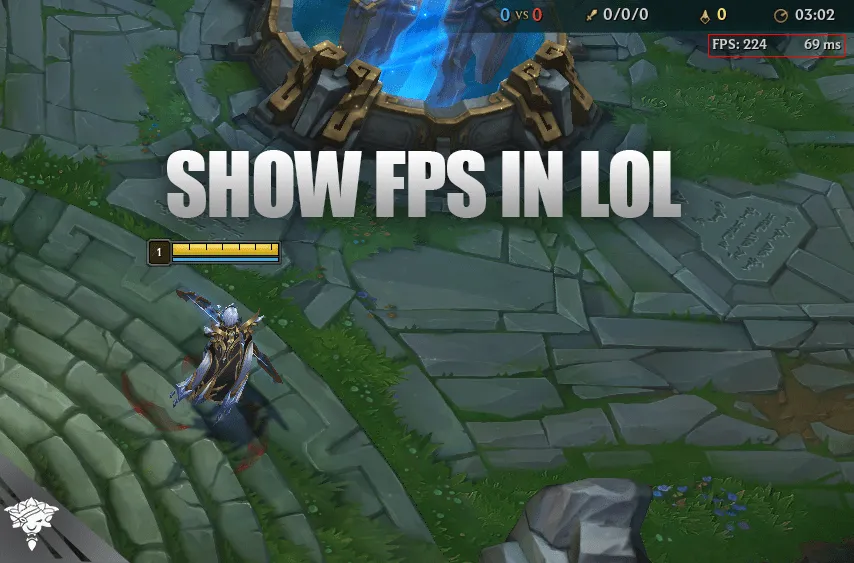
First, what is FPS? FPS stands for frames per second. It refers to how many still image frames your computer renders every second while playing a game. The higher your FPS, the smoother and more responsive your gameplay will feel. Many gamers aim for 60 FPS or higher for a smooth experience.
But why display FPS in LoL? Monitoring your FPS lets you identify performance drops. When your FPS suddenly tanks during intense team fights, it could cause annoying lag and choppiness. By keeping an eye on FPS, you can tweak graphics settings to improve performance before it becomes an issue.
Also Read: LoL Smolder Abilities, Release Date, and more!
How to Show FPS and Ping in LoL
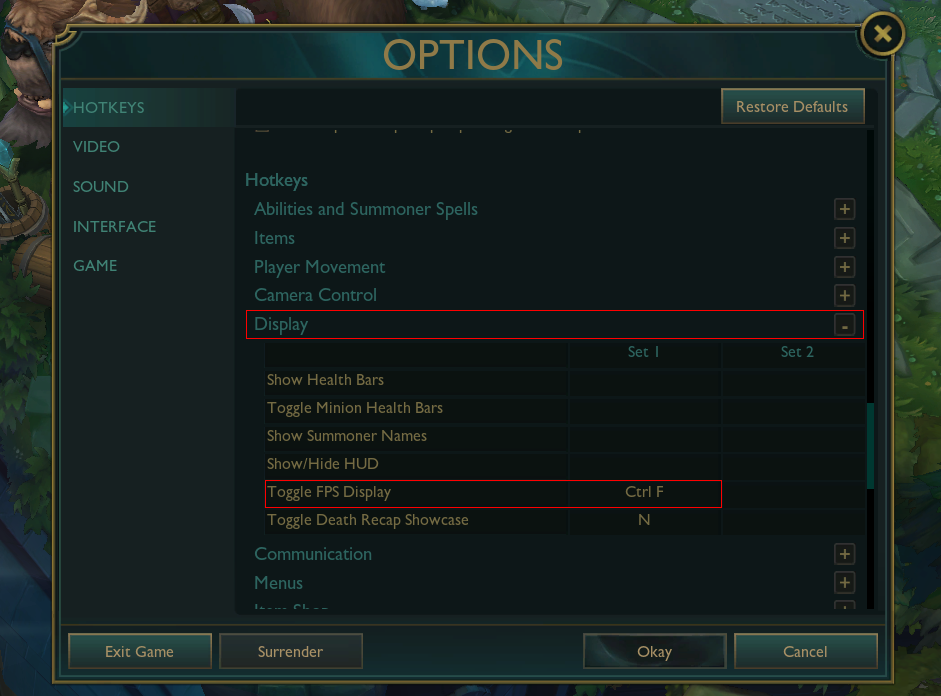
To display your frames per second (FPS) and ping while playing League of Legends, simply press Ctrl + F in-game to toggle the FPS and ping counter on. This will make them appear in the upper right corner of your screen.
If you want to change the hotkey binding for toggling the FPS/ping display, just simply follow these steps:
-
Open the League of Legends, head to practice tool, and go to the Settings menu
-
Scroll down to the “Hotkeys” section
-
Under “Hotkeys” click on the “Display” tab
-
Find the “Toggle FPS Display” binding and click on it
-
Press the new key you want to bind the FPS display toggle to (e.g. F10)
-
Click save to keep the new hotkey for toggling the FPS display
Now in-game you can press your newly bound hotkey (F10 for example) to turn the FPS counter on and off.
How to Show Ping in LoL
Showing your ping in LoL is quite easy to do. To display your ping in League of Legends, press Ctrl + F and your ping will be visible. Using this method will also show the FPS, so you will have both ping and FPS shown on your screen.
If this method isn’t working for you then follow the next method:
-
Press the ESC key on your keyboard
-
Go to Hotkeys
-
Find Display
-
Go to Toggle FPS Display
-
Set the key as “CTRL + F” or the key you prefer

How to get more FPS in LoL
There are several tweaks you can make to boost your frames per second (FPS) in League of Legends. Lowering your in-game resolution puts less strain on your graphics card, so setting it to something like 1280×720 can provide a noticeable FPS increase. Turning off vertical sync in the Video Settings by disabling “V-Sync” is another option since it can limit FPS. Reducing quality options like shadows, character model details, and visual effects will also free up resources for higher FPS.
Closing any background programs and apps you aren’t actively using will devote more of your computer’s processing power solely to League of Legends. Updating your graphics drivers and Windows to the latest versions can eliminate software bottlenecks hurting FPS. Overclocking your GPU, if possible based on your card, can provide higher frame rates at high settings.
Finally, upgrading to a newer, faster GPU like an NVIDIA RTX 40 series or Radeon RX 6000 graphics card is the ultimate solution if your FPS is consistently low. Optimizing these software and hardware elements can help increase FPS for a much smoother League of Legends experience. Monitor your FPS counter before and after making changes to see which boosts performance.
What Is a Good Ping in LoL?
Ping in League of Legends is the amount of time it takes for a signal to travel from your computer to the LoL server and back. It is measured in milliseconds. A lower ping is better, as it means there is less delay between your actions and the game’s response.
A good ping in League of Legends is between 0-50 ms, an average ping is between 50-100 and a bad ping is above 100. If you have a higher ping than 100 then the game might be a little bit unplayable. If you are experiencing lag (or high ping), there are many reasons that might be causing this issue:
-
Far server location
-
Poor internet connection
-
Multiple users on the same connection
-
Background downloads
-
Weather
To fix these issues, make sure that you are playing on the nearest server. For example, if you are from Sweden, then you should play on Europe servers and not NA. Some programs in the background can also take speed from your internet. Check the task manager to see what’s running in the network, then right-click the program and click on End Task.
Difference Between Ping and FPS in LoL
Ping is a measure of the time it takes for a signal to travel from your computer to the game server and back. FPS is a measure of the number of frames that the game renders per second. A higher FPS will give you a smoother visual experience, but it will not affect your ping. The game will run very smoothly if you have a low ping (ideally, lower than 50) and a high FPS (ideally, higher than 60).
Conclusion
Optimizing League of Legends for high FPS takes some tweaking, but it’s worth it. By lowering resolutions, adjusting settings, closing apps, and upgrading hardware, you can unlock a competitive edge. Monitor your FPS counter using the toggle binding to track improvements. With smooth high frames per second, you’ll have an immersive and reactive League of Legends experience.
Finished reading? Check out our LoL Boosting service. We also offer a wide selection of high-quality League of Legends accounts. With our premium Smurf accounts, you can jump into the game with an advantage, skipping the grind and unlocking new opportunities.